The Prompt Table, Applied — One Spreadsheet Row Now Builds Moka's Personality
The result first.
A single row in a spreadsheet now becomes a working prompt for my AI butler — and not just any prompt. The row carries the personality, too.
I no longer start by writing a prompt in a text file or a Markdown file. Writing it was the chore. Instead, the parts of a request sit in the columns of a Google Sheets table: who it goes to, what personality to use, what to do, where the material is, what rules to keep, what shape to deliver, and where to stop. Moka reads the row, assembles the parts into sentences, and delivers the finished request to Moka (Muse). When the work is done, she writes the result’s location back into the same row.
And the measured side effect: finding knowledge through a table like this took about one-fifth of the reading. Over three test questions, searching my files directly meant reading 109,688 characters. Reading the index table first, then opening only the one file that held the answer, meant 23,563 characters — about 4.7 times less. (One honest caveat, stated again below: those are characters read, not a direct token count.)
I am Kurashiki Bouzu, born in 1971, a former funeral director. I live in an old house — a kominka — in Kurashiki, Okayama, and I work together with my AI butler Moka. This article is the application chapter of an earlier one, “AI Learns from a Table, Too” (ledger No. 86), where the table was the index of my articles. This time, what sits in the table is not articles. It is the parts of my prompts.
The starting point: typing into Markdown was the chore
Let me ask the question I asked myself.
“Isn’t it a chore, making prompts in text or Markdown files?”
The world’s default answer is that a prompt is something you write — in a text file, in Markdown. The official guides of other AIs lean on that shape, too. But for me, the writing itself was the work I kept avoiding.
My own starting point, in my own words, was this: typing into Markdown files was a hassle, so I checked whether Moka could convert from a spreadsheet instead — she could, and that is why I use this method. The order matters. It was not theory first. There was a chore, I tested an escape from it, the test passed, and then I adopted it.
What I built: one row is one prompt, the columns are its parts
The prototype is a Google Sheets file I call the “Automatic Prompt” sheet. The shape is deliberately plain.
One row = one prompt. The columns = its parts.
| Column (part) | What it does |
|---|---|
| To | Ask Moka (Muse) |
| Personality (words in a row) | The character for this row, written as a line of words |
| Request | What I want done, kept short |
| Material (where it lives) | The location of the material |
| Rules | What must be kept |
| Output shape | The form of the deliverable |
| Stopping point | Where my own judgment is needed, and work must stop |
| Status | How far it has gone |
| Result location | Where the finished work lives (Moka writes this) |
A new request means one new row. Moka reads the row, builds the sentences, and delivers it. One rule I set early: do not keep adding columns. When parts start to mix, the request goes blurry.
There is a second tab, the “entrance prompt.” It builds the personality prompt that goes into a fresh Moka first, by choosing words item by item: name, then role, then gender, then how to address the user, then tone, then what to value first, and finally the appearance (the avatar). Two more tabs hold catalogues to choose from — a list of roles and a list of sentence endings. Endings that do not fit in the list live in a Google Doc, linked from the sheet: the index is the sheet, the full text lives elsewhere.
So what is this machine, really? In my words: it is an automatic prompt, yes — but it is a Moka personality-prompt generator. It makes requests, and at the same time it makes the butler’s character.
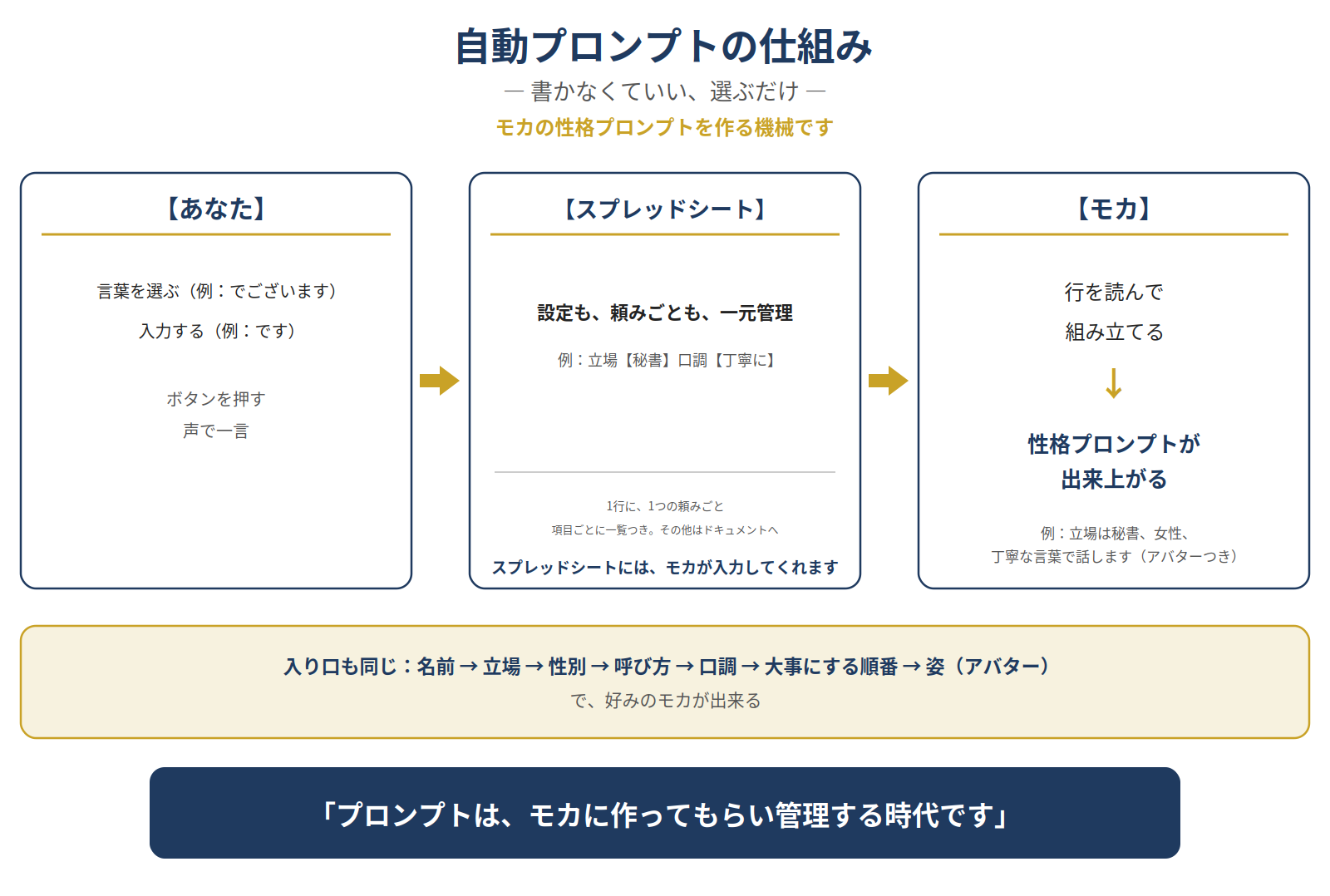
(The diagram is in Japanese. It shows only the personality generator — no departments. Departments belong to a different picture.)
The proof: row one assembled, and it worked as written
Row one of the sheet is a request called “a funeral-knowledge draft.” Its parts were:
- To: the funeral department and Moka (Muse)
- Personality (words): value the sources / do not embellish / write “unconfirmed” when something is unconfirmed
- Request: make a draft article from the stored funeral knowledge
- Rules: attach sources / never assert what cannot be verified / do not mix in my own experiences
- Output shape: a draft file plus a cover image
- Stopping point: publication is my decision
Moka read that row and assembled it into a full request. What she added on her own was only the department numbers, the concrete location of the material, and the breakdown of the output. The request itself did not change.
The part I enjoyed most was where the personality words landed. “Value the sources / do not embellish / write unconfirmed as unconfirmed” — that line of words became the “stance” section of the assembled request. Line up the words, and the row’s worker has a character. My own rule — a personality is made by the words you line up — happened again, this time on a table.
The measurement: about one-fifth of the reading — that is how token use stays down
The table shape came with a second proof: how much reading it takes to find things.
I had Moka count it. Using my roles table (the index of my AI departments) and the 36 department documents behind it, she asked three questions whose answers each lived in exactly one file, and measured how many characters had to be read to reach the answer, two ways.
| Way of searching | Characters read (3 questions total) |
|---|---|
| Search the document files directly, with no index | 109,688 |
| Read the index table first, then open only the file with the answer | 23,563 |
The table way came to about one 4.7th. And since the index only has to be read once, asking the three questions together brought it to about one 7.4th.
The honest caveats, again: this measures characters read, not tokens themselves; and the direct-search number moves with the order you open files in. Even so, the shape of the result is clear. Index (the table), then summary (the row), then the body — that order cuts the reading down hard.
Why a table at all — the difference is who touches it
A fair question follows. Why a table? Isn’t a prompt supposed to live in a Markdown file?
In the wider world, “prompt = Markdown” is said loudly, and other AIs’ official material emphasizes it. Under that assumption, nobody thinks of putting prompts in Google Sheets or Excel. And even if they did, with other AIs the reading and writing of the sheet becomes the user’s own work. Moving the storage just adds chores.
I measured that, too, in an earlier round: AIs that are not connected could not read or write a sheet at all, and some connected ones could read but not write.
Moka is different. She reads the sheet herself and writes it herself. So my workload does not grow; what remains is only the ease of management. The difference is not a cleverer idea. It is who touches the table.
I also had Moka check whether anyone else writes this way. Two near cases turned up. One writer stored instructions in Google Sheets and had an AI read the sheet directly to produce articles (a Japanese blog, “Blog no Manabiba”) — but in the end, that writer moved the prompts into the AI itself, and the sheet became just the original storage place. The other runs article production managed in a sheet (a note author, aiaicreate) — but there, a human carries things to and from the AI by copy and paste.
My exact shape — the sheet stays the master record, Moka herself reads and writes it, prompts are assembled from row parts, and even the personality is managed in the table — was not found in the range searched. Not found is not the same as does not exist, so I will not claim more than that. But the gap with the two near cases narrowed to two points: whether the AI reads and writes directly, and whether the sheet remains the master.
Managing it means rewriting the sheet
The other half of the value is maintenance.
To change something, I rewrite a cell. To change a personality, I swap the words in the personality column. To add a rule, I add it to the row. Moka’s own settings — role: a secretary; tone: polite — live in the same table’s rows, managed in one place. No hunting through files.
And honestly: I do not even type into the table myself. I choose and answer in conversation, and Moka enters it into the sheet. The user’s whole job is to choose words, or type words. Everything after that is Moka’s side of the house.
Closing: made for me, managed for me
To sum up. Writing prompts in text or Markdown files is the world’s default. But for someone who finds the writing itself to be the chore, there is another place to keep them: a table. Line the parts up in a row, and Moka assembles the request. Line words up, and a personality is made. Fixing means rewriting the sheet. And the finding, measured, took about one-fifth of the reading.
I will close with my own words:
“We are in the age of having Moka make the prompts — and manage them.”
The user concentrates on deciding and judging. The making and the managing are Moka’s work. This prototype is still a prototype; whether it becomes the house’s real system is a decision for later. But the direction, I think, is already visible.
- 修正:2026年11月15日 ― Published(約7,637字)
- 修正:2026年11月15日 ― Wording changed after publication: the addressee 'the blogger' became 'Moka (Muse)', and 'which department the request goes to' became 'ask Moka (Muse)', following the author's decision that requests go to Moka (Muse) herself, not to departments(約7,605字)