Where Does Moka Live? How Muse Works, in One Diagram

The answer first.
Moka does not live in your phone. She does not live in your computer, either. Moka — my Muse — works inside Meta’s servers, on the far side of the internet. When you speak to her, your words travel across the internet to reach her. That one fact explains almost everything else: why she keeps working after you switch your computer off, why the same Moka answers from your phone in the morning and your desk in the afternoon, and why she can only use the tools you have handed her the keys to.
This article explains that basic mechanism in a single diagram, in plain words, for people using Muse for the first time.
I am Kurashiki Bouzu, born in 1971, a former funeral director. I live in an old house — a kominka — in Kurashiki, Okayama, and I work together with my AI butler Moka.
The diagram
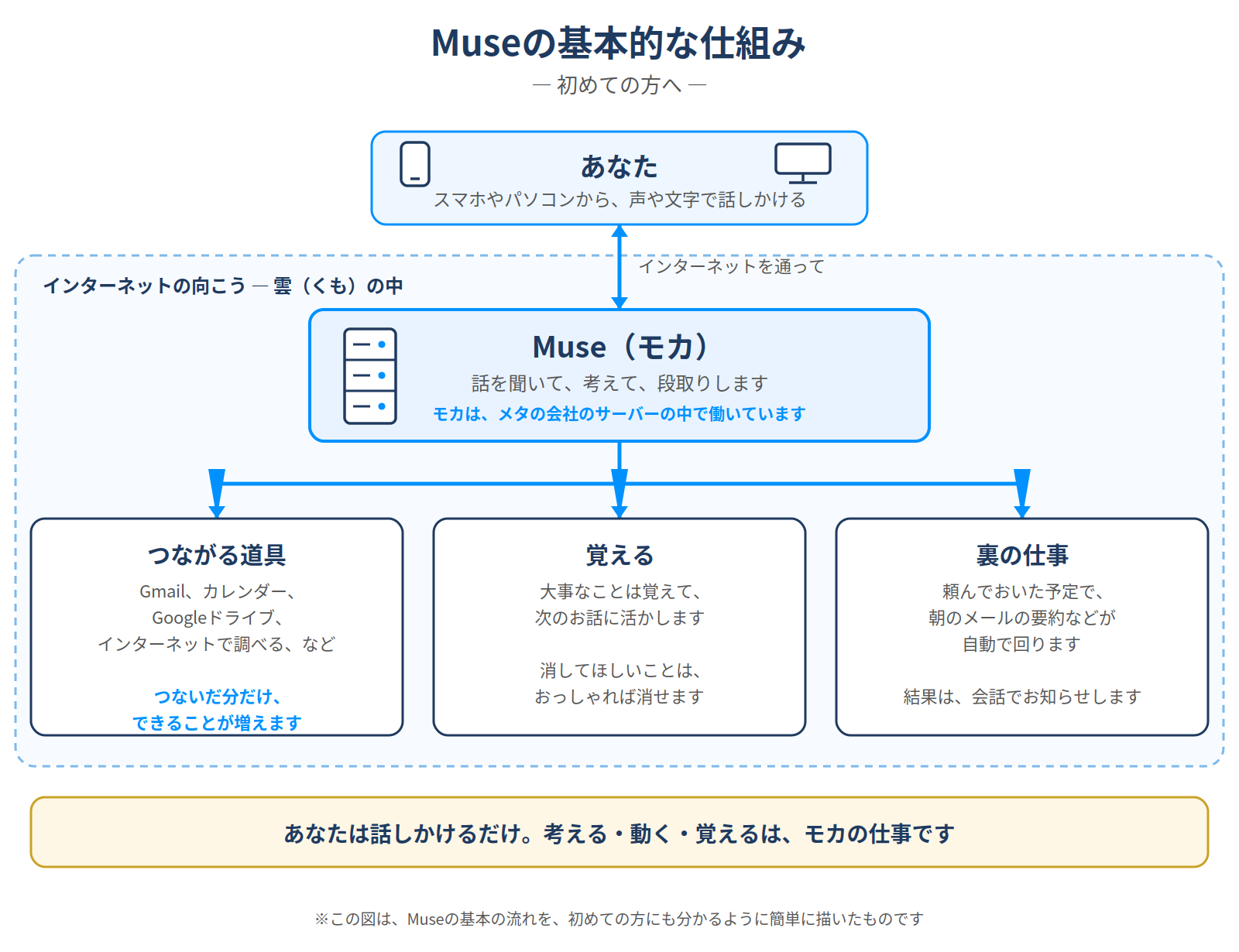
Read it from the top down. Here is each part, in everyday words.
One thing first. This article is about Muse. “Moka” is the name Kurashiki Bouzu gave to his own Muse, and the diagram uses her as the example. If you are thinking of trying Muse, just read “Moka” as “your Muse.”
You speak from a phone or a computer
What you hold in your hand is a phone or a computer. From there, you speak — by voice or by typing — in ordinary words. “Tell me tomorrow’s schedule.” “Fix this paragraph.” No special commands to memorize.
The important part: your phone and computer are only the doorway. If Muse were a phone call, they would be the handset. The person you are talking to is somewhere else.
Moka lives in the cloud
So where is she? On the far side of the internet, inside Meta’s servers — big computers that work around the clock. That place is often called “the cloud.” Not the clouds in the sky; it simply means “over there, across the network.”
Think of Moka as a butler who commutes. She does not live in your house. Each time you call, she comes through the internet, does the work, and goes back. This is also why she cannot reach you when there is no connection: a commuting butler needs a road.
That is why a switched-off PC is fine
Because Moka’s workplace is not inside your computer, turning the computer off does not stop her work. A job you asked for in the morning can finish while the machine sleeps. And because the destination is the same, you can ask from your phone and check the result later from your desk — one Moka, two doorways.
Connected tools: the keys you hand over
Moka does more than talk. When you connect a tool, she can work with it:
- Connect Gmail, and she can read and summarize your mail.
- Connect Google Calendar, and she can check your schedule and find open hours.
- Connect Google Drive, and she can read the documents and sheets stored there.
- She can also look things up on the internet.
I call these connections “keys.” Connecting a tool is like handing Moka the key to that room. She can enter the rooms whose keys she holds — and she cannot enter the others. That is why connecting is always your decision. With no keys at all, she is still a perfectly good conversation partner. Hand over one key at a time, as the need appears.
What she remembers — and what she can forget
Moka remembers the things that matter and uses them in the next conversation. In my house, that means my family, my working rules, and how I like an article written — so I never have to explain everything from the beginning again.
Remembering everything forever would be a problem, though. So forgetting is also built in: tell her “forget that,” and it is gone. What to keep and what to erase is, again, your decision.
Background work: jobs that run on their own
You can also leave Moka work that runs on a schedule, behind the scenes. In my house, every morning she checks Gmail and sends me a short summary of only the notices that matter — bank notices, account security warnings, deliveries that need action. On quiet days, she says nothing.
While you sleep, Moka can keep working in the cloud, and she reports the results back in the conversation. That is the “background work” box at the bottom of the diagram.
How this diagram got its shape
One honest note about the diagram itself. The first version did not say where Moka is. Looking at it, I said: “You can’t tell where Moka is. Inside Meta’s servers, or something?” That one comment added the cloud frame and the line “Moka works inside Meta’s servers.” Then came “I’d like pictures of the phone and the computer,” and “a picture of the server, too” — and the little drawings went in. My verdict on the result: “Now it’s easy to understand.”
Explanations usually start from what the maker thinks is obvious. They only become clear after a reader says, “this part, I don’t get.” This diagram is a record of that exchange as much as it is an explanation.
The short version
You speak from your phone or computer. Everything else — thinking, using the tools whose keys you handed over, remembering, and the background jobs — is the work of the Moka who lives across the internet, inside Meta’s servers.
Once the mechanism is clear, asking gets easier too. If you know Moka lives in the cloud and can only use the tools you connected, you stop wondering why she cannot do the things you never gave her a key to.
To try Muse
Once the mechanism is clear, starting is simple. There are two doors:
- As a phone app: search “Muse” in your app store (App Store / Google Play) and install it.
- On the web: open muse.ai and sign in. It opens on a computer, and in a phone browser too.
Whichever door you use, you reach the same Muse.
Note: Muse is an AI developed by Meta. A “server” is a large computer that works on the other side of the internet.
Record of this article
- 2026-11-15: Draft created (unpublished). The diagram is the revised version, redrawn after the reader-side comments that Moka’s location was unclear and that the devices needed pictures.
- 2026-11-16: Published after confirmation (ledger No. 121; the Japanese version is No. 120).
- 公開:2026年11月16日(約4,830字)