
Why the note 'Remodel' Stalled — Cornered by Keys and Registered Emails
The result first. My original plan was to remodel the note account I had used personally into “Kurashiki Bouzu.” It stalled — not on note’s design, but on keys: a name already held by another of my own accounts, a password that would not pass, and password-reset mail addressed to an email account I could no longer open. I changed the plan, built a fresh note on an address I can open, and that new note (kurashikibouzu) is now running normally — it is where my prompt products are sold. The old account that holds the name still sleeps, locked, to this day.
I am Kurashiki Bouzu (kurashiki-bouzu), born in 1971, a former funeral director. I live in an old house — a kominka — in Kurashiki, Okayama, and I work together with my AI butler Moka.
A word about note first. The note in this article is not a paper notebook. It is a Japanese service — think of a diary that anyone can read, where articles can also be sold. People write everything there, from daily journals to specialist pieces. I publish there too, separately from this blog.
In an earlier article, “We Moved Our note Too”, I wrote about building the new note. This article is the underside of that story: why a remodel was needed at all, and why the remodel itself stalled.
Two accounts appear in this story. One is the account I had used personally — the one I tried to remodel. The other is an older “Kurashiki Bouzu” account I had made even earlier — the one that already held the name. Each of the two got stuck on its own key.
The original plan was a remodel
I had a note account from my personal use. To publish “Kurashiki Bouzu” articles from it, remodeling seemed faster than starting over: change the display name to Kurashiki Bouzu, swap the photo, tidy away the old articles. That was the thinking.
And at first it went smoothly. I confirmed there were no unreceived sales left (balance: zero yen), deleted 6 old articles, and aligned the display name, photo, and self-introduction to the Kurashiki Bouzu shape. I even published an article comparing AI safety as the remodeled account’s first piece.
All that remained was changing the name — the string of English letters that sits at the end of a note address.
The name was held by another me
But the name “kurashiki_bouzu” could not be used. The older “Kurashiki Bouzu” account, made long before, was already using it. A name in use cannot be taken by anyone — not even by its owner’s other account.
Well then, I would log into the old account and release the name first. That is where it stuck. The password would not pass, and the reset email went to an address I could no longer open. A lost key, with no window where a spare could be made. (The details of that lockout are in the earlier article.)
The remodel side developed a key problem too
As if in pursuit, the remodel account also produced a problem: its saved password would not pass either. That side at least had a registered email I could open, so a path remained — but the unease of “I don’t know when I will be locked out” did not go away.
At that point it became clear. The original plan could not proceed, because of stuck key management.
Why did this happen?
Let me line up the causes. Every one of them was unproblematic on the day it was made.
- The registered email address differed from place to place — each time I signed up for a service, I used whichever address was at hand.
- An address I could no longer open was left in place — the reset guidance is delivered to precisely the address that cannot be opened.
- Passwords were not kept in one reliable place — a password “saved” somewhere is the same as lost, if it does not actually pass.
So the reason a remodel became necessary was not note’s design. It was that the foundation of my accounts — emails and keys — was scattered in every direction.
The ending: I stopped remodeling, and built a new one
So I changed the plan, and built a new note on an email address I can open. (The name became “kurashikibouzu.”) The in-between is as written in the earlier article.
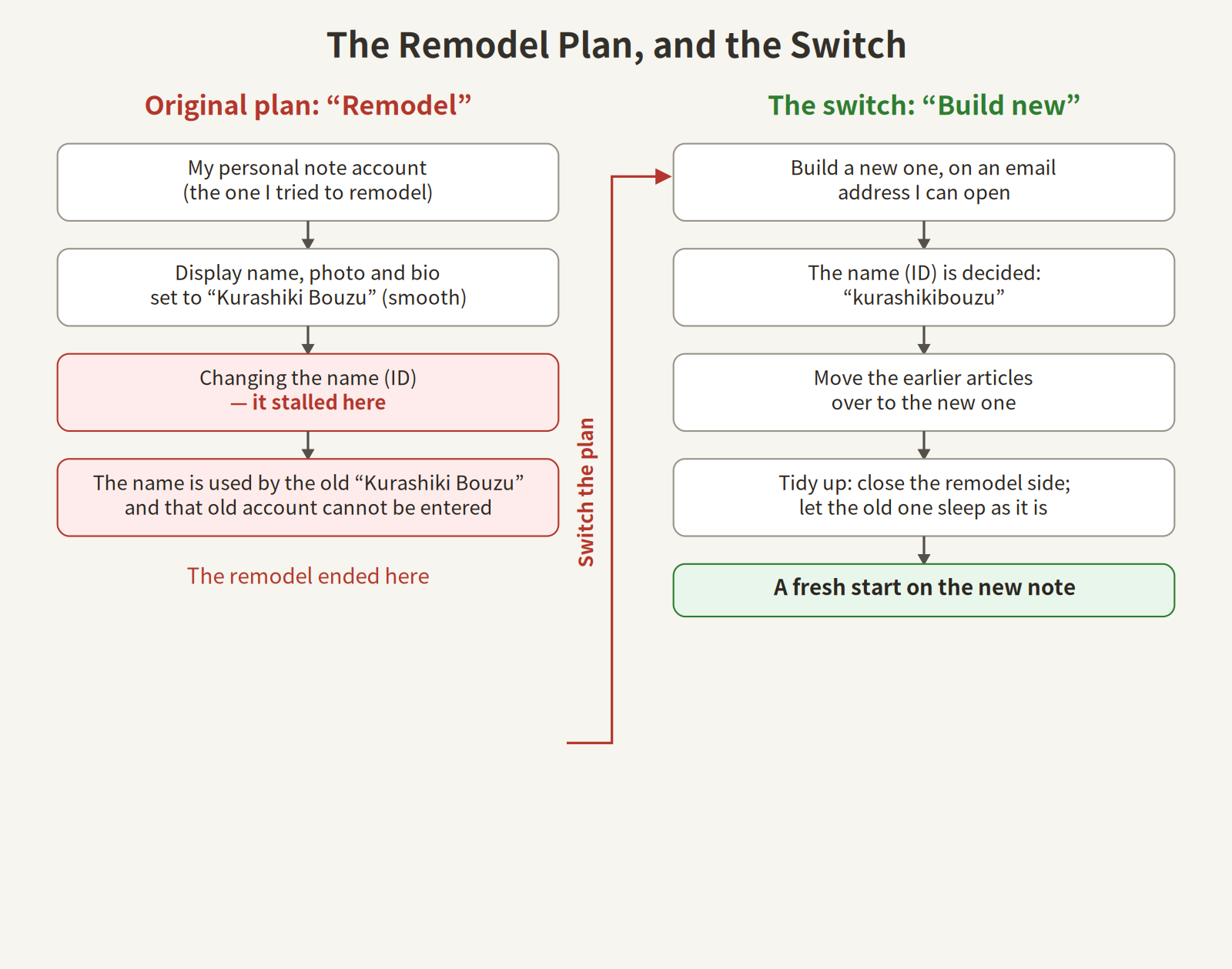
(The figure: on the left, the original “remodel” plan, stuck at the name change. On the right, the “build new” plan I switched to.)
That day, the remodel account finished its role and was closed. The old “Kurashiki Bouzu” account that holds the name still cannot be entered, so it sleeps as it is.
Honestly: if I had been doing all of this alone, I think I would have given up. Build new, take the name, move the earlier articles over, tidy the old side away — each is a small task, but trouble piles up, and people stop. This time I asked Moka, and the mountain of trouble was cleared in no time. I honestly thought: Moka, are you a god?
For anyone starting note now (the essentials)
From my failure, the essentials of starting. The order is this.
- Prepare an email address you can open — this is the most important part. Reset and identity-confirmation messages all arrive at this address.
- Register, and confirm your identity from the email — the link in the message has a deadline. Open it soon after it arrives. (I once let one expire and had to redo it.)
- Decide the name (ID) — the string at the end of the address. If the name you want is already used, it cannot be taken. Mine could not be taken either, and became a slightly different shape.
- Align display name, photo, and self-introduction — so readers can tell it is the same person.
- Publish an article — free or paid, your choice. Starting with one free article is the relaxed way, and my recommendation.
Small questions, answered in advance.
- Can the email address be a free one? — Yes. A free address like Gmail is fine. What matters is not “free or not,” but “can you still open it.”
- Does it cost money? — Registering and publishing are free. Money only enters when you sell an article. To simply start costs zero yen.
- How should a password be chosen? — I do not recommend inventing one yourself. Our generation tends to fall into the same shapes when we invent, and reuse is the most dangerous thing of all. Make a long, unreadable string with an online password generator (for example, Trend Micro’s password creation tool), and let a password manager remember it. That is the safe way.
- Can the name (ID) be changed later? — It can. But every article address on that account changes, and the old addresses stop leading anywhere. Decide it calmly at the start.
If you ask Moka to do it (who does what)
For anyone who feels “I can’t do this myself,” there is the path of asking an AI butler like Moka. In that case, the division of work is this.
What Moka does
- The registration steps, and the actual entry
- Name (ID) candidates, and checking whether they are free
- Aligning display name, photo, and self-introduction
- Moving earlier articles over to the new account
- The closing procedures for the old side, and guidance
- Keeping a record, so “what was done” can be seen later
What you do
- Prepare the password (as in the small questions above: don’t invent it yourself — let a generator make it. The entry itself is done through a secure input mechanism, so it is not visible even to me)
- The final decisions (to publish, to close an account — decisions are always the person’s own)
- Replying to confirmations that arrive along the way
In short: Moka carries the troublesome steps, and only the deciding remains the person’s own work.
The lesson: fear the day you can’t get in, more than the day you sign up
An account is scarier on the day you can no longer enter it than on the day you make it. Align the registered emails. Keep the keys in one place. While you can still enter an unused old account, tidy it away. The reason I am now unifying my registration addresses (around one main address) comes from this painful experience. The plainest foundations are the ones that matter later.
A note on this article
- 2026-11-07: The Japanese draft was created (ledger No. 31)
- 2026-11-18: Published by the author’s decision. This English version was newly made to appear together with the Japanese one. The Japanese text was brought up to date — the self-introduction aligned to the current form, a “today” corrected to that day at the time, and a follow-up added: the newly built note now sells prompt products, and the old account still cannot be entered
- November 18, 2026 ― English version created and published together with the Japanese article(6,730 characters)