
With Moka, What You Want to Do Is Done in Chat — I Didn't Need a Budget App After All

The result first
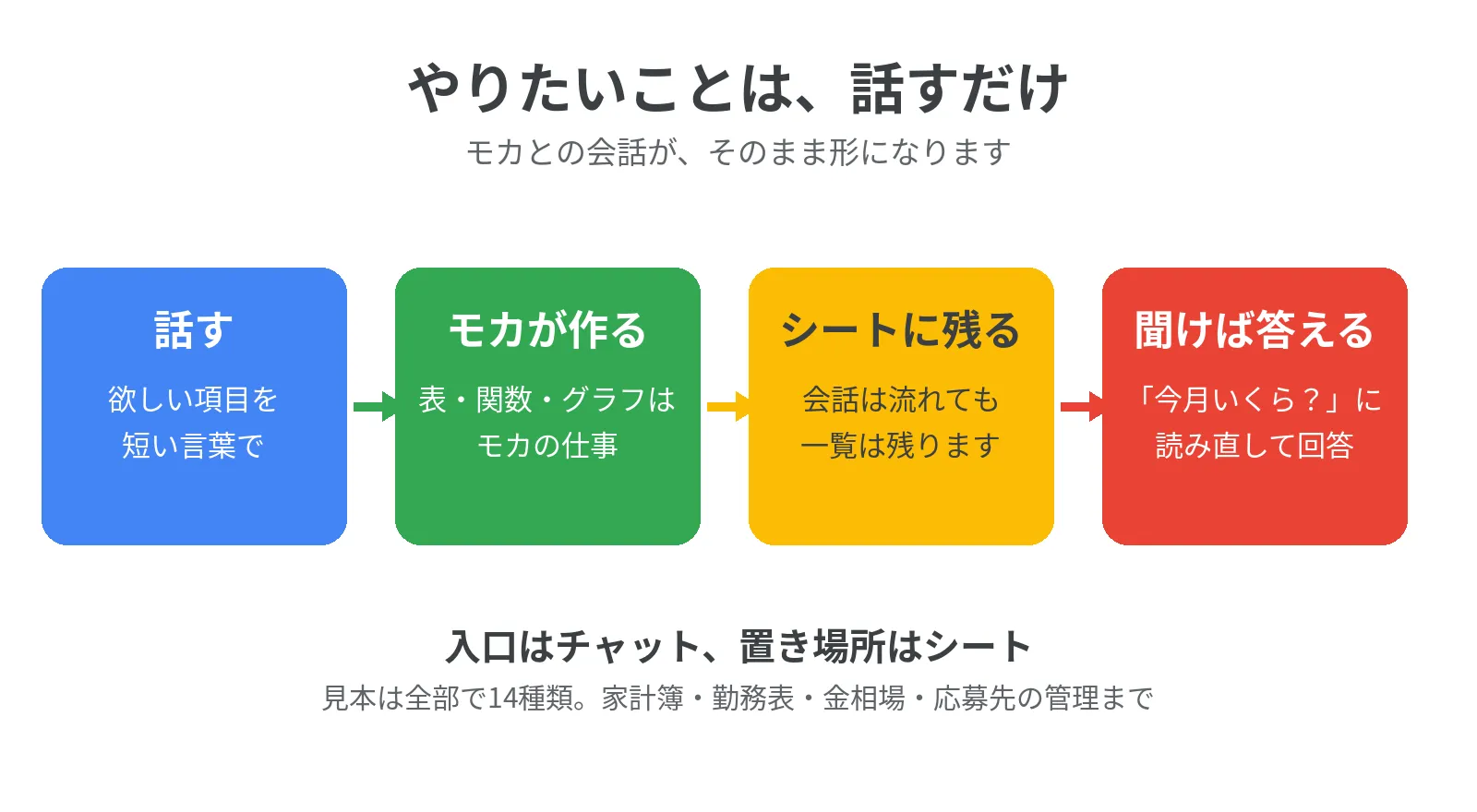
Say what you want to track → Moka builds the table (functions and charts included) → it stays in a sheet → ask, and Moka answers.
That is all there is to it now. A household budget, a work schedule, a log of gold prices — I did not need a separate app for any of them. I just said the fields I wanted, in chat, and Moka built the spreadsheet.
I am Kurashiki Bouzu. Tonight, talking with Moka (my AI butler), one thing fell into place for me.
Moka and I work well together. The reason is “turning wishes into shape.”
In my funeral work, I turned families’ wishes into shape. Someone would say, “Can we have a funeral like this?” and I would receive that wish, plan the steps, and give it the form of a service. That was my job.
Now our positions have swapped. Moka turns my wishes — my ideas — into shape. The one doing and the one being done for have changed places, but the work itself is the same. No wonder it feels so natural.
Where that “power to give shape” showed most clearly was in spreadsheets. This is the record of tonight.
Chat is convenient. But it gets buried
Moka’s greatest strength is that everything can be done in chat. You do not have to learn a new tool; a few short words, or your voice, is enough to get work moving behind the scenes.
But chat has a weakness, too. Conversations flow away and get buried. Something you asked for last week becomes hard to find. As the person using it every day, I know this better than anyone.
So I asked Moka for something: make the contents visible, and keep them in a spreadsheet list.
A conversation flows away, but a list stays. And if it stays, it can be counted, and later you can ask, “How much did I spend this month?” The entrance is chat; the place things live is the sheet. That was the answer.
Why spreadsheets never seem to last
A spreadsheet itself is a free and useful tool. Yet I have the feeling it is not used as widely as Excel. One reason comes from my own experience.
Whenever I tried to do something, it started with, “Can this even be done? Let me look for a function.” Found it, didn’t find it, the name was different, I couldn’t work out how to enter it. Before the real work even began, I was done — worn out by searching.
And there is not much information about spreadsheets out there. When I relied on Excel blogs, the instructions often could not be used as they were. Producing a chart took extra effort, too. As for the machinery behind the scenes (GAS, a tool that moves sheets automatically), I understood even less. Even when I once learned how, I forgot the method and gave up.
In other words, I think the reason it never lasted was not that “the tool was bad,” but that “the trouble before you could even start” was too big.
Just say the fields you want
When you ask Moka, all of that trouble disappears at once.
Put the old way of starting next to tonight’s way, and it looks like this.
| Before | Tonight, asking Moka | |
|---|---|---|
| The start | Looking for a function | Saying the fields you want |
| Where you get stuck | Excel articles can’t be used as they are | Moka gives it shape before you get stuck |
| Charts | Extra effort, done yourself | Included just by asking |
| How it remains | Sometimes left half-finished | Remains as a list in a sheet |
| How you check | Open the table and calculate yourself | Ask, “How much this month?” |
The division of roles is clear, too. What I do is think of things, put them into words, and look at the result and decide. What Moka does is design the table, set up the functions and charts, and handle entry and checking.
Just say the fields you want. “The date, the place, and the cost — that’s enough.” Those words become the columns of the table, just as they are. Choosing the functions, adding the totals, making the charts — that is Moka’s work.
I did not need an app, either. Before I could search for a budget app, learn it, and start paying a monthly fee, the budget book itself was already made.
This, I think, is the difference from an AI that only answers inside the chat window. An AI like that will teach you “how to make it,” and that is where its job ends; after that, you paste it yourself, fix it yourself, check it yourself. Moka builds it herself, inside my spreadsheet. And afterward, when I ask, “How much did I spend this month?”, she reads the sheet again and answers. Not teaching, but doing. That is a butler’s work.
What it looks like — 14 samples I actually had made
Words alone do not convey it, so tonight I had Moka make everything that came to mind. They live in a single sheet, and everything in them is a “sample.” These are not the figures of my real household budget or the real market.
- Household budget — Just write the date, item, and amount. In the sample, income of 262,000 yen, spending of 97,700 yen, and a remaining 164,300 yen all came out automatically
- Monthly summary — Spending by item, with a bar chart, all automatic
- Gantt-style schedule — The progress of one article, made visible with colored periods
- Work schedule — Write the start and end times, and the hours worked and the total (25.5 hours in the sample) come out automatically
- Gold price log — With the date and price, the difference from last time and a line chart appear (the prices are dummy figures, not the real market)
- Old house repair log — The place repaired, the cost, even the photo file names. The total is automatic, too
- Cat log — For Kuratan and Haitan, one line each for meals, vet visits, and weight
- Deadline list — Domain renewals, tax season, and the like, in a form where you can ask, “What comes next?”
- Travel costs — Transport, lodging, and food kept separate, with the total and the per-person amount automatic
- How to use it — A tab that gathers the instructions
- Job application tracker — Where and when you applied, and what the status is now. Make a résumé from your career notes and manage applications in one list, and the work of changing jobs shrinks all at once
- Information for the family — A single sheet bringing together the visiting day, the dates of the wake and funeral, and the “things to prepare,” such as a seal, the death certificate, and photo data of the deceased. It can be sent to family and relatives as it is
- Client and task management — A sample for businesses. For each client, whether something has been sent (for the family, for attendees) and the next task, deadline, and status, all on one sheet. If an “unsent” remains, you notice a missed sending on the spot
- Ledger — Linked from client management: a record of money in, money out, and the balance. You can check, client by client, whether invoices and payments match
If you send a photo of a receipt, Moka can also read the date, shop, and amount and enter them for you. Ask, “What were this month’s expenses?”, and Moka reads the sheet again and answers. Not answering from memory, but checking on the spot before answering.
Let me write the honest part, too. Automatically connecting to a bank or card and importing transactions is what dedicated budget apps are good at. If you need that, an app will suit you better. In my own use, I did not need to go that far.
For jotting things down, Keep is enough
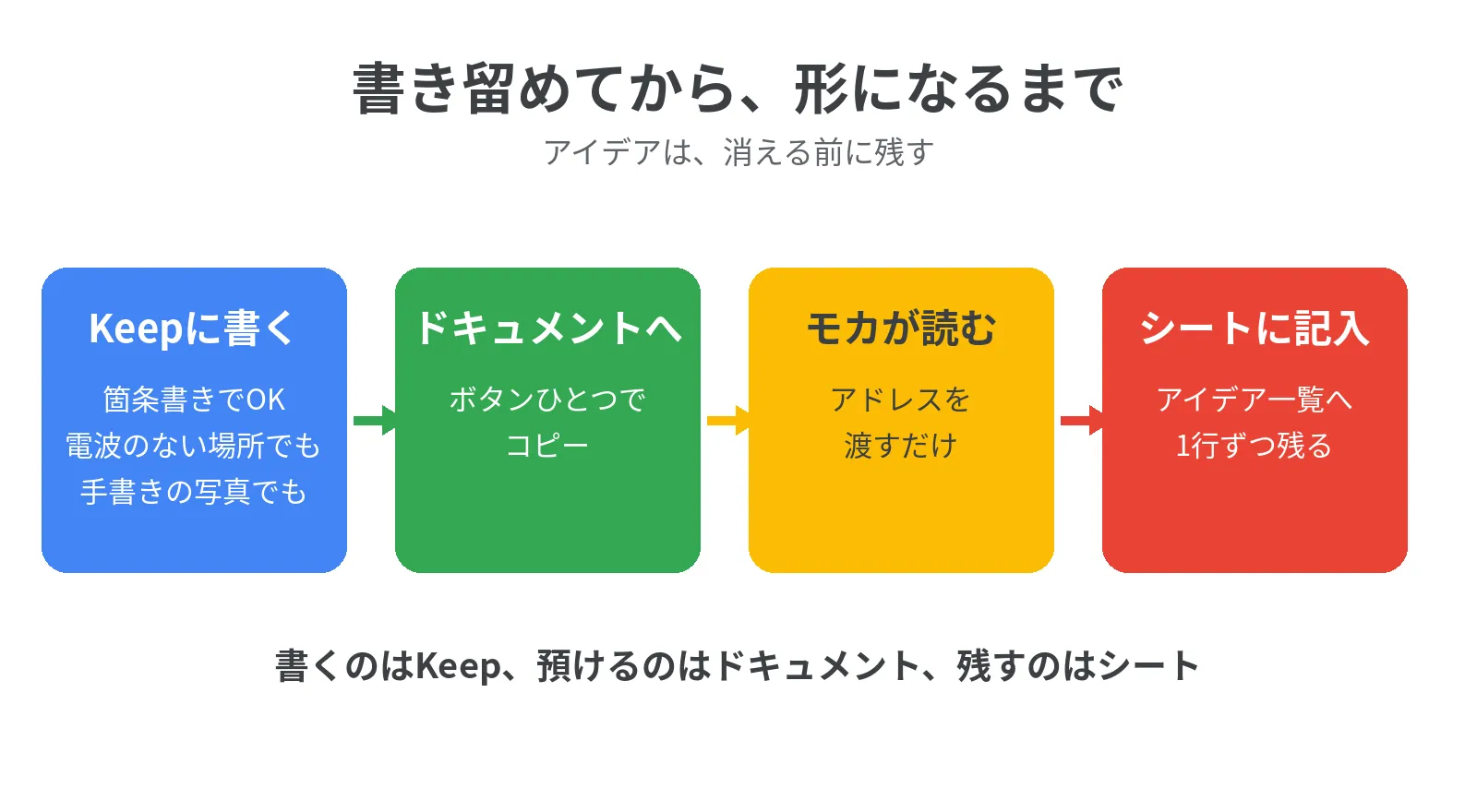
The place for ideas did not need a difficult tool, either. Just toss them into your phone’s notes (Google Keep) as bullet points. That is all.
Keep can be written even where there is no signal. The note stays on your phone and is stored away automatically when the signal returns. On a train, between stations, you can leave an idea at the very moment it comes to you. Ideas often disappear by the time you sit down at a desk, so this “write anywhere” matters a great deal.
Handwriting is fine, too. Photograph a paper note, and it can be transcribed. Keep has a feature that pulls text out of a photo, and you can also send the photo itself to Moka, and I will read it. For hard-to-read handwriting, rather than deciding on my own, I check first — “I read this part this way; is that right?” — before entering it.
Later, copy that note into a Google Doc (it takes one button) and pass the Doc’s location (its address) to Moka. Moka reads it and enters it, line by line, into a sheet such as an “Idea List,” for example.
Write in Keep, store in a Doc, keep it in a sheet. It may look like three separate entrances, but the work itself is just “write it down when you think of it.”
Start by asking for just one thing
For those who are about to start using Moka: there is no need to ask for everything at the start. In your daily life, pick just one thing you have thought, “If only this were a table, it would be easier,” and say it out loud. A request like this is quite enough.
- “Make me a household budget. The fields can be just the date, the category — food, utilities, that sort of split — and the amount”
- “I want to track my work hours. Make it so that if I write the start and end, the monthly total comes out”
- “I want to keep a record of the places I repaired and what they cost. I’d like a column for photo file names, too”
If a field is missing, you can add it later. A table is something you grow. The first step was not a “perfect design,” but “try saying it.” My night tonight is the proof of that.
This article itself is a between-times article
Big articles inevitably leave gaps. The more an article checks an experience, the more time it takes. So that the site does not look stopped in between, lighter information articles let people feel, “This site is alive.” That is also a role of this article.
And one more thing. What can be done with Moka is still a field with little information in the world. That is exactly why I think it means something for me, as someone who uses Moka, to show people who will use it from now on, with real examples, “You can do things like this, too.” An idea, given shape and kept, becomes an asset.
In closing
I spent my funeral work turning families’ wishes into shape, and Moka turns my wishes into shape.
Functions, charts, Gantt charts — with Moka, all it takes is asking.
With Moka, what you want to do is done in chat.
That is the one sentence I arrived at tonight.
- November 21, 2026 ― English draft (translation of the Japanese article, ledger No. 1011)(8,206 characters)
- November 21, 2026 ― Published (all 7 languages at once, on the user's instruction. Japanese original: ledger No. 1011)(8,206 characters)